
Play VegasNow on your phone, straight from the browser
VegasNow is built to run in Safari, Chrome and other mobile browsers, so your phone gets the same lobby, cashier, bonuses and account settings as a desktop. There is nothing to download: add VegasNow to your Home Screen and it opens with one tap.
- iPhone, iPad & Android
- No download needed
- 18+ only

- 4 deposits matched 150 / 100 / 50 / 25%
- A$20 minimum per offer
- 40× wagering on bonus amount
18+ · T&Cs apply
The full casino in your pocket
Open VegasNow in your phone's browser and you land in the same lobby you would see on a laptop: pokies, live casino and table games, with search by title or provider and your Saved games list ready to go.
Sign in once, and your balance, active bonus, loyalty points and limits are all exactly where you left them on any other device.
Open VegasNow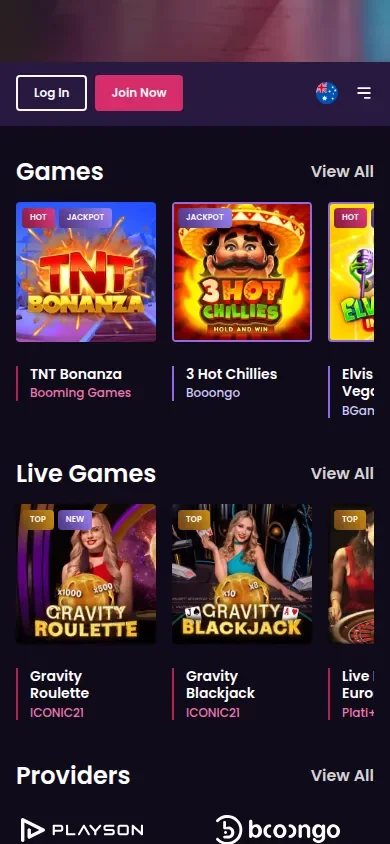
Add VegasNow to your Home Screen
A Home Screen icon gives you app-style access without an app store. It takes less than a minute.
- iPhone and iPad (Safari): open VegasNow, tap the Share button, choose Add to Home Screen, and leave Open as Web App switched on so it opens full screen.
- Android (Chrome): open VegasNow, tap the More menu (three dots), then choose Install or create shortcut and confirm.
- Sign in from the icon. Tap the new icon and sign in. Your browser can remember your username if you allow it.
- Keep the browser updated. The site runs on your browser, so current versions of Safari and Chrome give the smoothest play.
iPhone and Android, step by step
The menu names as they appear in Safari and Chrome.
| Step | iPhone / iPad (Safari) | Android (Chrome) |
|---|---|---|
| 1. Open the site | Visit VegasNow in Safari | Visit VegasNow in Chrome |
| 2. Open the menu | Tap Share | Tap More (three dots) |
| 3. Add the icon | Add to Home Screen | Install, or create shortcut |
| 4. Choose display | Keep Open as Web App on | Confirm the shortcut |
| 5. Play | Tap the VegasNow icon and sign in | Tap the VegasNow icon and sign in |
Home Screen icon or browser tab: what changes
| Home Screen icon | Browser tab | |
|---|---|---|
| Lobby, cashier and account | The same | The same |
| Address bar | Hidden when opened as a web app | Visible, so the domain is easy to check |
| Sign-in session | May keep its own, so expect to sign in once inside it | Shared with the browser |
| Updates | Loads the live site on every tap | Loads the live site on every visit |
If something looks odd inside the icon, open the same page in an ordinary tab and check the address there.
What travels with you from desktop
One VegasNow account, whichever screen you use.
A single login
The same username and password on every device, with password reset available from the sign-in screen.
The complete cashier
Card, MiFinity, Cashtocode and crypto deposits, plus withdrawals from My Account.
Bonuses and codes
Claim welcome stages and weekly offers, and enter VEGAS2, VEGAS3 or VEGAS4 from your phone.
Loyalty points
Points earned on mobile count exactly as they do on desktop, and the Loyalty Store is available on both.
Your limits
Deposit limits and self-exclusion apply to the account, so they cover every device.
Why VegasNow is a browser casino
We do not offer a VegasNow app in the App Store or on Google Play, and we do not distribute an APK file. If you see a download claiming to be a VegasNow app, do not install it; the real VegasNow opens in your browser.
Running in the browser has practical advantages. There is no download to fill your storage and no app update to wait for, because each time you open VegasNow you get the current version of the lobby and cashier. Games load on demand rather than being bundled into an app, and the Home Screen icon gives you the one-tap access most people want from an app in the first place.
It also means one set of rules. The bonus terms, payment limits and account tools on your phone are the same ones that apply on desktop, so there is no separate mobile version of an offer to keep track of.
How to spot a fake VegasNow app
Search for a casino app and you may land on a store listing, a downloadable APK or the real site saved to a Home Screen. Only the last one is ours. A familiar logo or the VegasNow name on a download page says nothing about who built the file.
- A page asking you to allow “install unknown apps” on Android is not us. Our site needs no download and no change to that setting.
- An installer that asks for your VegasNow username and password should be closed without signing in.
- An icon that opens an unfamiliar address should be deleted and saved again from the genuine site.
If you did enter your details into something suspicious, reset your password from the real sign-in screen and tell [email protected].
Games that suit a phone
Pokies and live studios both play in a mobile browser.









Getting the best from mobile play
Pokies such as Gates of Olympus and Elvis Frog in Vegas play comfortably on a phone screen. Live games like Lightning Roulette and Crazy Time stream video, so a stable Wi-Fi connection gives the best picture, and a weak signal can interrupt a round.
If a stream stutters, close other apps and browser tabs, switch to Wi-Fi if you can, and reopen the table. Keeping your browser up to date helps too.
Deposit and withdrawal limits on your phone
The same limits as desktop, from our AU payment table.
| Method | Deposit range | Withdrawal range |
|---|---|---|
| Credit card | A$30–10,000 | Not listed for withdrawals |
| MiFinity | A$30–4,000 | A$30–4,000 |
| Cashtocode | A$25–400 | Not listed for withdrawals |
| Inpay / PayAnyBank / wire | Not listed for deposits | A$300–6,000 |
| Bitcoin | From 0.0001 BTC | 0.0002–0.12 BTC |
| USDT | From 5 USDT | 20–4,000 USDT |
| Ethereum | From 0.002 ETH | 0.002–20 ETH |
Banking from your phone
The cashier on mobile is the full cashier. Card deposits start at A$30 and MiFinity at A$30; Cashtocode suits smaller top-ups up to A$400; crypto deposits have coin-specific minimums and no listed maximum. Every payment method must be in your own name. We cover our own deposit costs, though your bank, wallet or network may charge a fee of its own.
Crypto is particularly convenient on a phone if your wallet app is on the same device: copy the deposit address from the cashier, paste it into your wallet, and check the coin and network match before you send. Withdrawals are requested from My Account, and verification must be complete before the first one. Each deposit must be wagered three times before related funds can be withdrawn.
Our payments page lists every deposit method and the withdrawals page covers payout routes and instalments for large amounts.
Claiming bonuses on mobile
The welcome package works identically on a phone. Your first deposit of A$20 or more (A$30 if you pay by card or MiFinity) earns a 150% match up to A$1,500 plus 200 welcome spins, with no code needed. The second, third and fourth stages use the codes VEGAS2, VEGAS3 and VEGAS4, entered in the cashier when you deposit.
A A$100 first deposit gives a A$150 bonus, and with 40× wagering that is A$6,000 of qualifying bets within 7 days. Keep each bet at A$8 or below while the bonus is active, and remember pokies count 100% while roulette counts 25%, blackjack and game shows 10% and baccarat 0%.
Weekly offers such as Lucky 7s Load Up on Tuesdays (77% up to A$77) and Friday Night Spotlight (40 free spins per qualifying Friday deposit) show their codes in your account. The welcome bonus page and weekly promotions page have the full details.
Loyalty points and the Loyalty Store on mobile
Every real-money bet you place on your phone earns loyalty points at the same rates as desktop: 1 point per A$25 on slots, 1 per A$100 on roulette, and 1 per A$250 on blackjack and baccarat. A A$500 evening of pokies on the train home therefore adds 20 points to your account.
The Loyalty Store is available from your account on mobile too. At the starting Golden Glimmer level, 200 points exchange for a A$5 bonus, and saving 2,000 points brings A$60. Bonuses bought with points carry 40× wagering, the same as other bonuses. Your level is based on status points across all devices, and our VIP and loyalty page lists the published thresholds and the VIP Lounge benefits.
Tablets and larger screens
Everything on this page applies to tablets as well. On an iPad, Safari's Add to Home Screen creates the same icon as on an iPhone, and on Android tablets Chrome's Install option works the same way. The extra screen space is especially useful for live tables, where you can see the dealer, the betting grid and your chips at once, and for pokies with large grids such as Gates of Olympus.
If you switch between a phone and a tablet during the week, there is nothing to sync: sign in on either and you see the same balance, Saved games and bonus progress.
Signing in on a new phone
New to VegasNow? Registration on mobile asks for the same details as desktop: your account details, country, currency and date of birth. Verification is a separate step that we may ask for later, for example before your first withdrawal, and you can upload documents from your phone's camera roll when the time comes. The registration page explains each step.
Already have an account? Sign in on the VegasNow sign-in screen with your existing details. If you have forgotten your password, reset it from the same screen. The login help page covers common sign-in problems.
Need help while you are out? Our customer care team can be reached by email at support@vegasnow.com from any device; include your username and a short description, and attach a screenshot if something looks wrong on screen. The support page explains what to include for each kind of question. VegasNow is operated by Just Entertainment B.V. (Curaçao company 160603) under Curaçao Gaming Authority licence OGL/2024/164/0246, which you can check on the licence register.
Quick fixes for common mobile hiccups
Most problems on a phone have a simple cause. Try these before contacting us.
- The page will not load properly. Refresh, then close and reopen the browser. If it persists, clear the browser cache for the site and sign in again.
- A card deposit is declined. Check the amount is at least A$30, that the card is in your name, and whether your bank allows the payment.
- A bonus has not appeared. Only one bonus can be active at a time, and stages two to four need their code (VEGAS2, VEGAS3, VEGAS4) entered with the deposit.
- The Home Screen icon asks you to sign in. That is normal after a sign-out or a cleared cache; enter your details again.
- A live stream keeps pausing. Move to Wi-Fi or a stronger signal and close other apps that use data.
If none of those help, email support@vegasnow.com with your username, the device and browser you are using, and a screenshot of the issue.
VegasNow froze mid-task? Check before you tap again
A frozen screen does not tell you whether your last action reached us. If it stopped during a deposit, a withdrawal request or a document upload, look at the cashier and your bank or wallet app for a pending payment before pressing the same button again. A second tap can mean a second deposit.
Hold off clearing the cache or switching phones until you know where things stand. Then send support the phone model, operating system and browser versions, the screen you were on, the time and any reference shown. Crop screenshots so no password or full card number is visible. Our support page lists what helps for each kind of question.
Keeping phone play in check
A casino that is always in your pocket needs limits that are always on. Deposit limits set in your account apply on every device, so a limit you set on desktop also stops deposits from your phone. Self-exclusion works the same way across the whole account.
Decide your budget before you open the icon, not after. A limit you set when you are calm is the one that works.
Samuel Thomas, VegasNow
Turning off notifications for other gambling apps and keeping VegasNow off your main Home Screen page are simple ways to make play a decision rather than a habit. If you need to talk to someone, Gambling Help Online is free and confidential on 1800 858 858. Our responsible gambling page explains every tool we offer.
Phone play, answered
Quick answers about VegasNow on mobile.
Is there a VegasNow app to download?
No. VegasNow runs in your mobile browser and there is no App Store, Google Play or APK version. Add it to your Home Screen from Safari or Chrome for one-tap access.
How do I add VegasNow to my iPhone Home Screen?
Open VegasNow in Safari, tap Share, choose Add to Home Screen and keep Open as Web App switched on.
How do I add it on Android?
In Chrome, tap the More menu, choose Install or create shortcut, and confirm.
Is my balance the same on mobile and desktop?
Yes. It is one account, so your balance, active bonus, loyalty points and limits are the same everywhere.
Can I claim the welcome bonus on my phone?
Yes. The first stage needs no code; use VEGAS2, VEGAS3 and VEGAS4 for stages two to four. Each stage needs at least A$20.
Do I earn loyalty points on mobile?
Yes, at the same rates as desktop: 1 point per A$25 on slots, 1 per A$100 on roulette and 1 per A$250 on blackjack and baccarat.
Can I withdraw from my phone?
Yes. Request withdrawals from My Account once your identity is verified. Method limits are the same as on desktop.
Is there a separate VegasNow bonus for mobile players?
No. There is no app-only or mobile-only offer. The same four-stage welcome package, up to A$8,000 plus 500 free spins, applies on a phone, a tablet or a desktop, with codes VEGAS2, VEGAS3 and VEGAS4 for stages two to four and the same 40× wagering. The welcome bonus page sets out each stage.
Does the VegasNow Home Screen icon cost anything or use much storage?
Saving the icon is free and installs no casino program, so it takes up next to no space on your phone. Each tap loads the current site from the internet. Deposits, provider fees and bonus terms are exactly the same as when you play on a desktop.
Can I play VegasNow offline?
No. The icon is a shortcut to a live website, so pokies, live tables, the cashier and your account all need a connection. If your signal drops during a live round, note the time and the table name, reconnect, and contact support if the result of that round is unclear.
Should I install an APK if the VegasNow site is not working on my phone?
No. We do not supply an APK, and installing a casino-labelled file will not fix a browser problem. Refresh the page, update Safari or Chrome, clear the cache for the site or try another connection. If it still fails, email [email protected] with your device, browser and a screenshot of what you see.
Where to next
Set up your account and start playing on mobile.